








Need extra privacy on your diagnostic tablet? Both MUCAR series (892BT, 892BT PRO) and THINKCAR 689BT series (689BT, 689BT Pro) diagnostic scanner include a smartphone-style screen-lock feature for improved device privacy and data security. Follow the method below to set up your device easily.
Steps to Configure the Lock Screen
- Power on your or MUCAR or THINKCAR scanner and go to the main home screen.
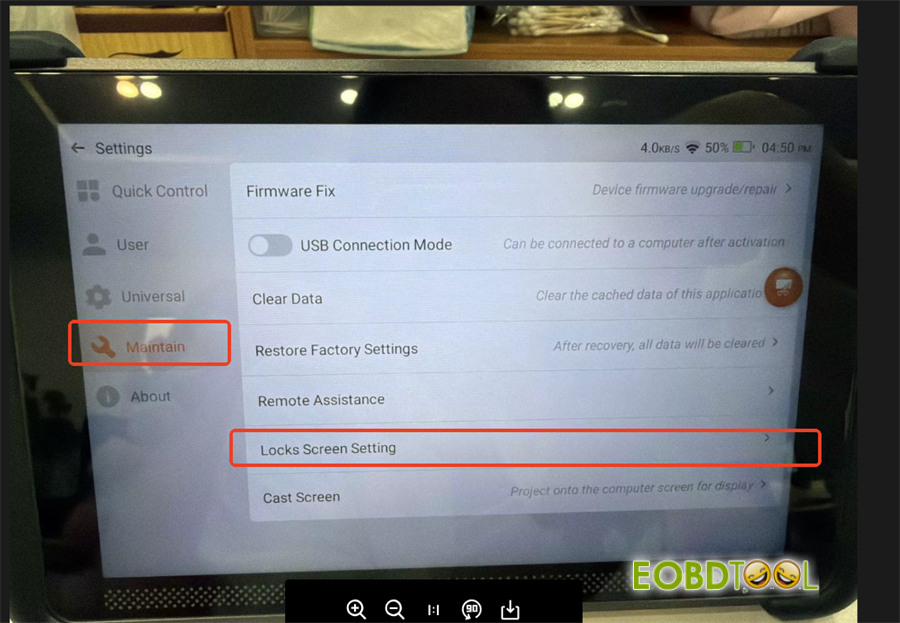
- Tap on the Settings app or icon (usually represented by a gear).
- Locate and select the Maintain option from the menu.
- Tap on Lock Screen Setting.
- Choose your preferred security method—such as a swipe pattern, a PIN, or a password—to secure your device against unauthorized access.
- Follow the on-screen prompts to confirm and activate your lock code.
Read also:
THINKCAR MUCAR 892BT vs. MUCAR 892BT PRO: Is the Topology Upgrade Worth It?







