Is your Lonsdor K518 series key programmer due for an update? You can easily unlock a 20% discount on your annual software subscription renewal by claiming a built-in promotion code directly from your device.
Follow this quick guide to find your promo code and apply the discount with an authorized dealer.
Step-by-step guide:
To successfully claim your subscription discount, follow these four simple steps:
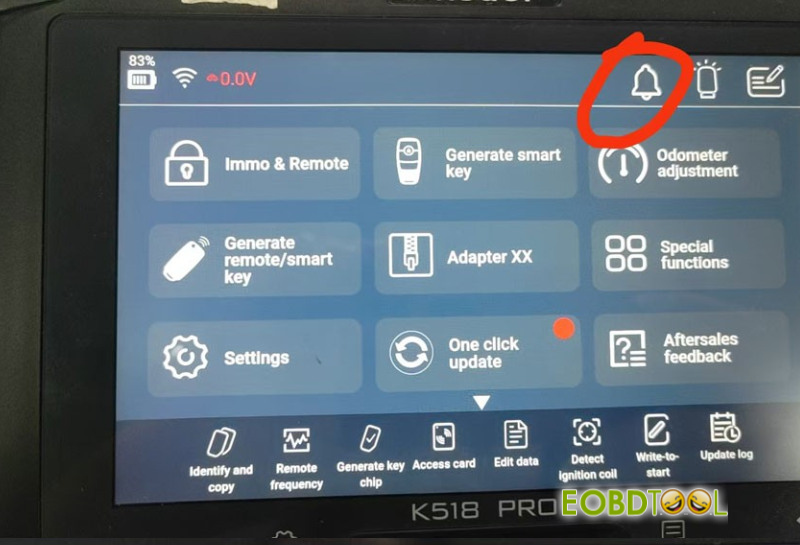
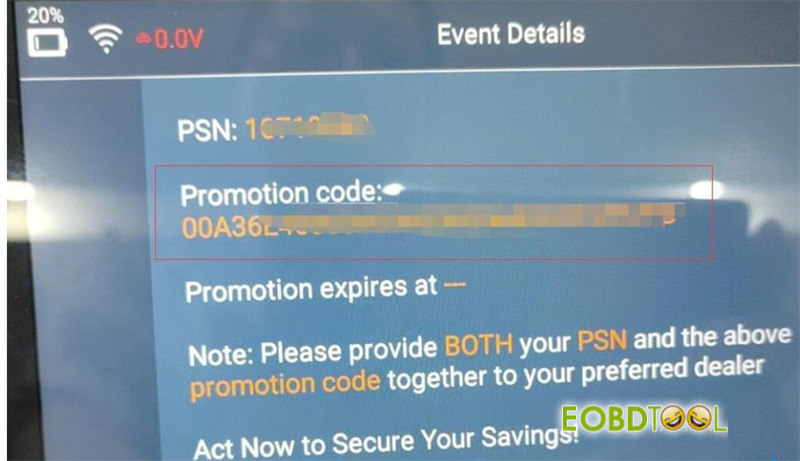
- Retrieve the Promo Code:Turn on your Lonsdor K518 PRO (or other K518 series device) and ensure it is connected to Wi-Fi. Look at the top right-hand corner of the home screen and tap the bell icon. Your unique promotion code will appear on the screen.
- Find Your Device PSN:Locate your device’s Product Serial Number (PSN). You can easily find this printed on the back of your tablet or listed within the device settings menu.
- Contact an Authorized Dealer:Reach out to an official Lonsdor distributor (such as co.uk) to buy your annual update package.
- Apply Your 20% Discount:Provide both your generated promo code and your device’s PSN to the dealer during checkout. If your current annual subscription is still active, they will apply an approximate 20% markdown on the standard renewal price. If your device has already expired, you will typically pay the original/standard rate.